WiFi Switch
"Alexa, Garden Lights On (or Off)"
Turn mains stuff on and off by shouting at Alexa
Interface
"Alexa, Garden Lights On (or Off)"
It's basically just a mains relay in a waterproof box that you talk to.
Motivation
I need to turn the garden lights on and off from inside the house, ideally on a schedule as well as on demand.
I tried something from Amazon but it was kind of janky/unreliable and the relays tended to weld themselves closed due to the high inrush current from the LED power supplies. Also, it had a remote control but no timer function, so I made my own. Because it's Alexa controlled I can set it up on a schedule and/or talk to it.
Overview
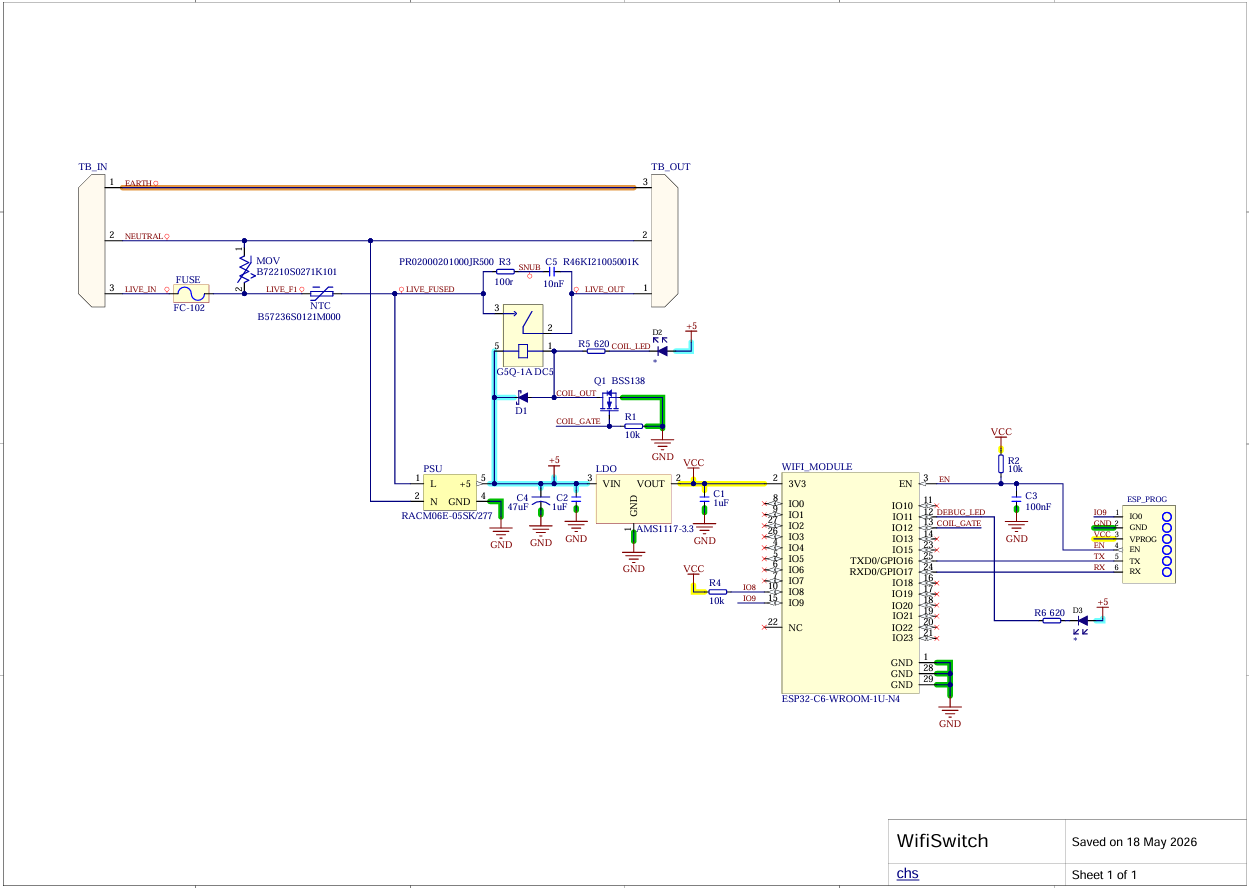
It's an ESP32-C6 on a board with a mains PSU and a relay, sitting in an IP68 junction box. When it powers up it joins the WiFi and opens a connection to a small server I run. When you ask Alexa to turn it on, Amazon tells my server, and my server tells the switch.
- 2 layer PCB, sized to fit a Deenlai FSH716 IP68 junction box
- ESP32-C6 module with external antenna on a u.FL connector
- RECOM AC/DC module for 5V, plus a 3.3V LDO for the ESP32
- Relay switched by a MOSFET, with flyback diode and snubber
- Fuse, MOV and NTC thermistor on the mains input
- Firmware is in C using ESP-IDF
- Server is in Go, running on a cheap VPS
- A tiny AWS Lambda function, because Amazon insists (see below)
Schematic
PCB
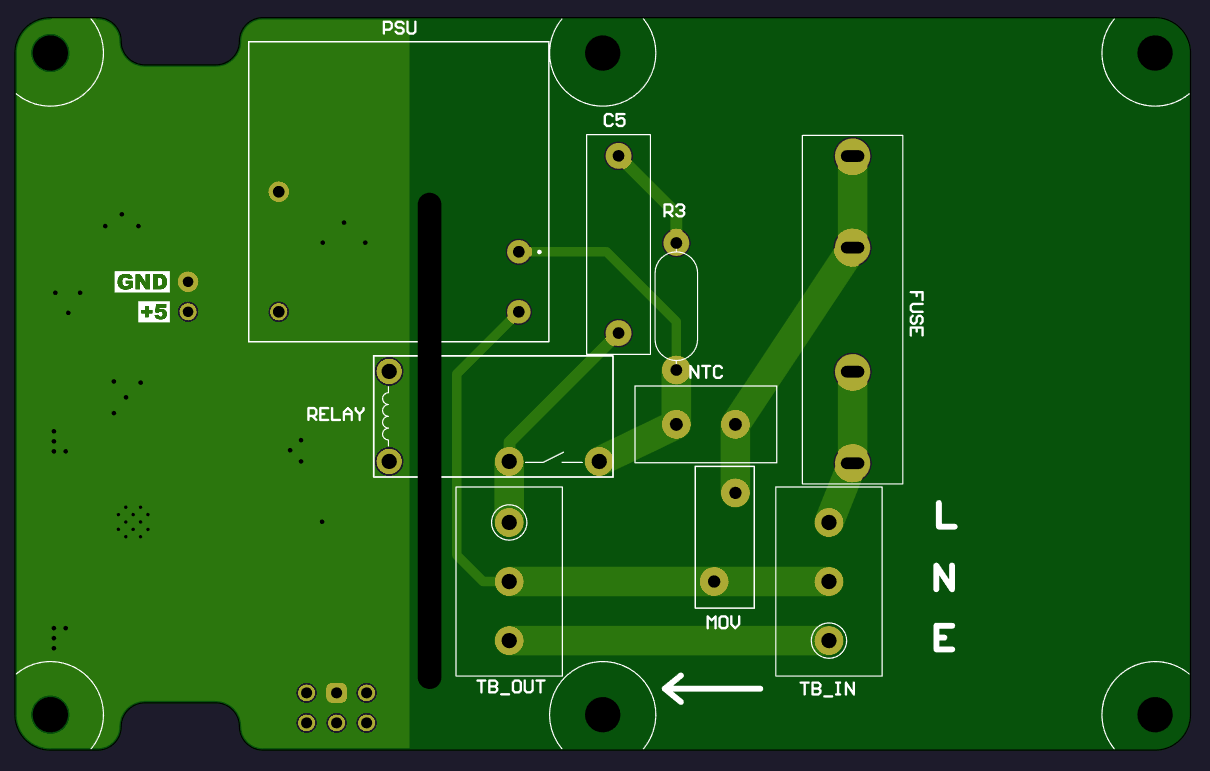
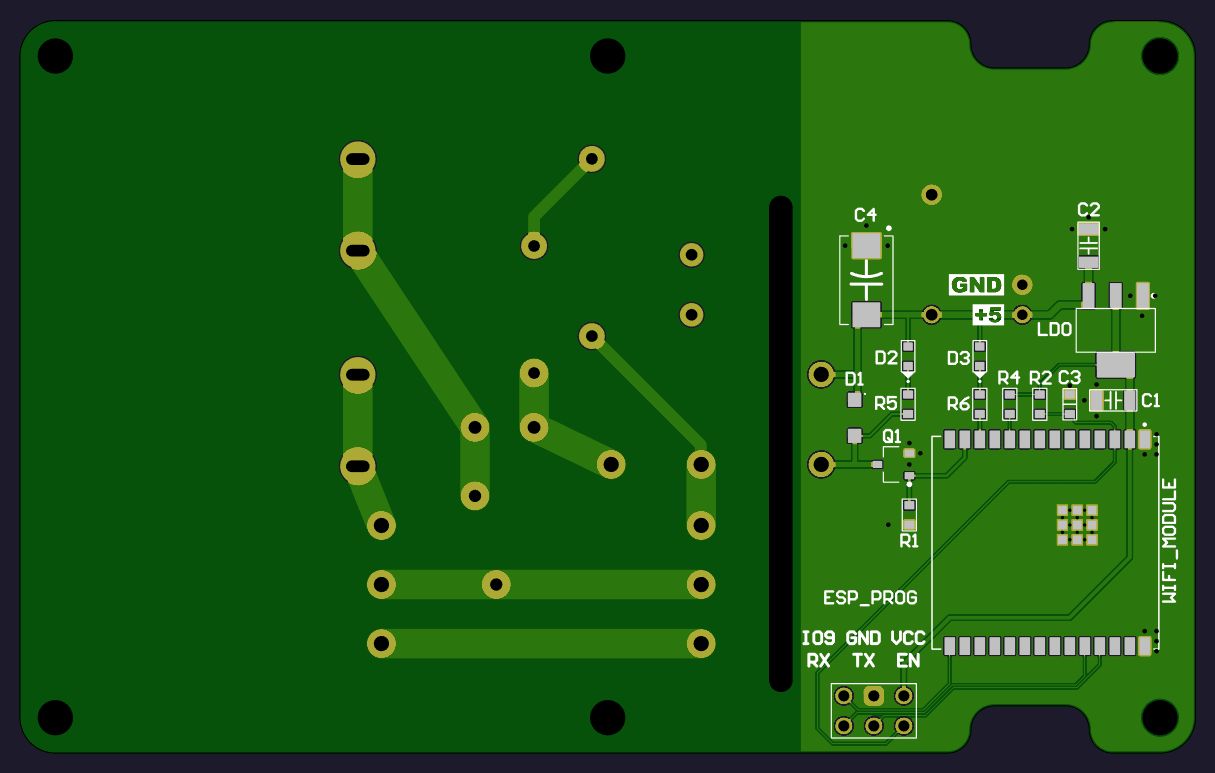
It's a 2 layer board. The mains side and the low voltage side are kept well apart, and there's a routed slot through the board between them for extra creepage distance.
All the mains components (PSU, relay, fuse, MOV, NTC,X capacitor and terminal blocks) are on the top, the ESP32, LDO and other small parts are on the bottom.
Mains comes in on TB_IN (L, N, E) and the switched output leaves on TB_OUT. There's an arrow on the silkscreen so I don'twire it up backwards, which I would otherwise definitely do.
There's a 6 pin header for programming the ESP32 but I just use the USB for flashing it, the header's just in case of emergency. And there's a 5V/GND pin pair so I can power the low voltage side without the mains, which is handy. It does in theory support OTA FW update but I haven't really tested that.
The status LED is so you can see what's going on without plugging in a serial cable. Fast flashing means looking for WiFi, slower (twice a second) means waiting for BLE set up, and a flash every 2 seconds means WiFi connected but it can't reach the server. When everything's working it stays off, apart from a half-second flash whenever Alexa tells it to do something.
Setup
The tricky bit with a WiFi gadget that has no screen or keyboard is getting the WiFi password set up.
I used Espressif's BLE provisioning: the first time it powers up it advertises itself over Bluetooth, and you use Espressif'sESP BLE Provisioning app on your phone to choose your network and type in the password. It's saved in flash, and after that it just connects.
Provisioning uses Security 2, which is SRP6a under the hood. Each device has a 6 character PIN made from its MAC address. A Python script works out the PIN,generates the SRP salt and verifier, flashes them into their own little partition, and makes a printable label with a QR code. You scan the QR code with the app and you're done.
The PIN itself never goes on the device; only the verifier does.
The first time it boots, the switch also makes up a random 256 bit secret and keeps it in flash. I copy that into the server's config file along with the MAC address, and from then on the server knows the device is legit - this is all massive overkill for a one-off device but... so what.
Operation
The switch opens a secure WebSocket to my server and keeps it open. It says hello with its MAC address, firmware version and secret, and then just waits to be told what to do.
Doing it this way round means there are no ports to open on the router and no need to know the device's IP address. As far as the router can tell it's just making an HTTPS connection out.
On the Alexa side, it's a Smart Home skill so you get the proper Alexa experience: it shows up as a device in the Alexa app, you can put it in routines and groups, and the voice commands are all set up for you.
Annoyingly, Smart Home skills have to be fulfilled by an AWS Lambda function. Custom skills can point at any HTTPS endpoint, but not Smart Home ones.
I didn't want to move it all onto AWS just because of that, so the Lambda is a short JavaScript stub that passes each request straight to the server and passes the reply back. It's well inside the free tier.
So the whole chain is:
Echo -> Alexa cloud -> Lambda -> Server -> WebSocket -> ESP32 -> Relay
Account linking uses Login With Amazon. When Alexa sends a request it includes a token, the server checks with Amazon who that token belongs to, and then looks up which devices that person owns. For now that's just me, but it would work for more people.